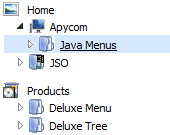
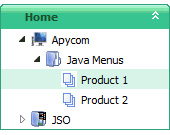
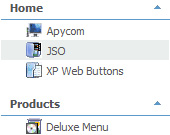
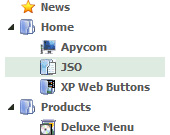
The template emulates Vista OS menu style. To open submenus click on menu items. The appearence of this template is determined by the following parameters:
- The menu have XP Style; Animation effect for subitems - Toggle-mode support. - Items have icons - Menu has a static position and is placed within the table cell
Key features:
- Each item can have individual settings - Several menus on one page - Status string shows item labels - Submenus expand/collapse on mouseover - Inactive/Disabled items - Relative/Absolute menu position - Unlimited number of sub levels - Filters and Transitional effects
Menu Screenshots Html Vertical Navigation Bar Tree
When the page is scrolled the menu remains visible. The Javascript/DHTML Tree can "float" along one or two coordinate axes. After clicking on menu item selected item becomes highlighted.
Recent Questions Html Vertical Navigation Bar Tree
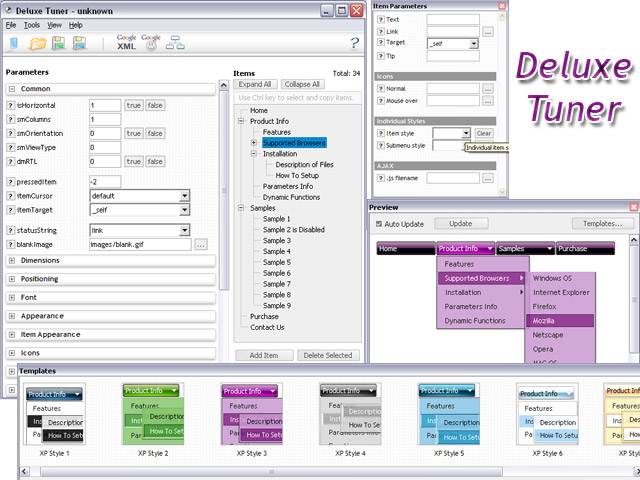
Q: However,I am trying to create a menu like<http://deluxe-tree.com/data-samples/tree-menuxp3.html> and amfrustrated.
Where can I get a template or instructions on which parameters I ammisunderstanding in deluxe tuner?
I want a menu with the expandable + signs on the left which will expandon rollover and allow only one to be expanded at the same time.
A: You should set the following parameters
var texpandItemClick = 1; var tcloseExpanded = 1; var tcloseExpandedXP = 1;
Try to do it in the new Deluxe Tuner beta version. We've fixed somebugs with these parameters in the new version.
Q: I am using Javascript Menu. JavaScript Tree Menu. v1.12 How can I upgrade to v.2.0?
A:How to upgrade to v2.00 --------------------------------------------------------------- You can download the licensed engine .js files from the same link in your license message.JavaScript Tree Menu v2.00 has new parameters and features. To upgrade to v2.00 you should do the following.
Step 1. 1.1 For Windows users a. Run Deluxe Tuner v2.0 (can be found in the trial menu package v2.0 http://deluxe-menu.com/deluxe-menu.zip). b. Open menu data file (.js file where menu parameters are placed): select File/OpenЕ c. Save the file: select File/Save, then click "No" button when the dialog box appears.
1.2 For other OS users a. Open menu data file (.js file where menu parameters are placed) in a text editor. b. Make sure that the following variables exist in the data file:
var keystrokes = 0; var dm_focus = 1; var dm_actKey = 113;
var dynamic = 0; var smHideOnClick = 1; var itemAlignTop = 'left'; var smSmartScroll = 1;
var dmAJAX = 0; var dmAJAXCount = 30; var dmRTL = 0; var dmObjectsCheck = 0; var menuBackRepeat = "repeat"; var menuHeight = ""; var transDuration2 = 200;
If one of the variables doesn't exist - add it at the beginning of the file.
c. Save the file.
Step 2. Now open HTML-page that contains JavaScript Tree Menu.
Step 3. Replace existent tags of the menu by the following code:
<noscript><a href="http://deluxe-menu.com">Javascript Menu by Deluxe-Menu.com</a></noscript>
Step 4. Save HTML-page.
Step 5. New engine v2.00 has 7 .js files. They are: - dmenu.js - dmenu4.js - dmenu_add.js - dmenu_dyn.js - dmenu_key.js - dmenu_cf.js (new v2.00) - dmenu_popup.js (new v2.00)
Replace all old .js files by the files from v2.00.
Try that.
Q: I have downloaded the trial version of JavaScript Tree Menu and am seriously looking at buyingit. I am trying to go thro the instructions and check out if it meets my requirement.
I am not able to figure out how to equally space out all my menu items on the javascript menu bar.
My menu bar width is fixed at 800 px and I have 7 items - horizontal type. The menuitems widths appear different for the menu items. How do I ensure that all of them are ofequal size ??
A:Set width for the items using Individual styles:
var itemStyles=[ ["itemWidth=100px"], ] //style 0 Assign Individual Styles for the menu Items.
Q: If you will go to my site you will see that the buttons turnwhite or unload and reload when hovered over. Is there anything I can do toprevent this?
A:You can have such effect when the page entirely was not loaded yet. So, images were loaded only for the 1 state and for the other were not loaded yet.
If you don't want to have such effect you can use 1 state buttons.
Arrow-Bar Download Arrow-Bar Download Page. Arrow-Bar is an easy-to-use verticalnavigation menu. HTML Compress Pro - A tool to compress web pages. It reduces the size of web pages but
Vertical Menu Bar Template Vertical Menu Bar Dhtml Menu Over Frames. Make your website neat and well-organized with Deluxe JavaScript Menus!
PICASSO NAVIGATIONBAR - free download We created a navigationbar which contains the best qualities. Now you can simply draw flash buttons, which are necessary for you. No restrictions!
Ball-Bar Download Ball-Bar Download Page. An easy-to-use verticalnavigation menu. WebDwarf Free is Virtual Mechanics' easy to use drag-and-drop web page maker
PICASSO NAVIGATIONBAR - free download We created a navigationbar which contains the best qualities. Now you can simply draw flash buttons, which are necessary for you. No restrictions!
Flash NavigationBar Template Flash NavigationBar Menu Lateral En Flash. 3d Buttons and CSS Menus for your web pages with no hassle! Free flash navigationbarhtml Download - flash navigation
CSS NavigationBarFreeHTML XHTML CSS JavaScript DHTML XML DOM XSL XSLT RSS AJAX ASP ADO PHP SQL tutorials, references, examples for web building.
CSS NavigationBarFreeHTML XHTML CSS JavaScript DHTML XML DOM XSL XSLT RSS AJAX ASP ADO PHP SQL tutorials, references, examples for web building.
CSS Tutorials: CSS Lists, CSS NavigationBar, CSS Menus CSS navigation menus tutorials - How to create CSS dropdown menus, flyout menus, CSS Horizontal and VerticalNavigation Techniques with HTML List Items and CSS. Listamatic
CSS Tutorials: CSS Lists, CSS NavigationBar, CSS Menus CSS navigation menus tutorials - How to create CSS dropdown menus, flyout menus, CSS Horizontal and VerticalNavigation Techniques with HTML List Items and CSS. Listamatic